Roblox Troubleshooting

Make yourself familiar with troubleshooting steps for a variety of our most common issues.

ESP Troubleshooting
ESP Lagging / Low FPS / Unsmooth Overlay

Distort is fully external and uses your CPU to draw the overlay on your screen. This can be intensive, especially for older machines. To improve performance, try the following:

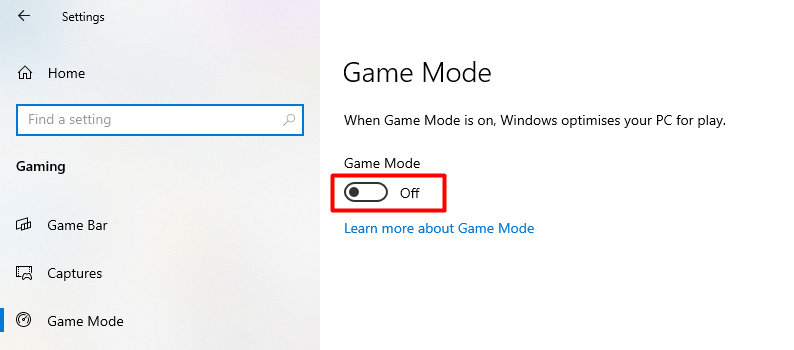
  1. Go to windows settings → select gaming → select game mode → disable "Game Mode"

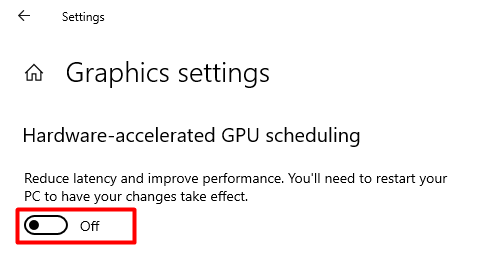
  1. Go to windows settings → select system → select display → select graphics settings → disable "Hardware-Acceleterated GPU scheduling"

  1. You must restart your computer.

If the above solutions do not work, you can also fix this by limiting your FPS in CS2 with the "fps_max console.

Set the fps_max value to be slightly above your average fps. _Example: if you normally get 200fps, then set fpsmax to 210 If the above solutions do not work, please open a ticket at https://distort.wtf/account/tickets and include your PC specs, and winver.

ESP in Wrong Position / 4:3 Stretched Resolution Setup

To fix this issue, please follow these steps:

  1. Set your windows resolution to match your CS2 resolution

    1. Go to windows settings → select system → select display → select your desired resolution.

Put your desired resolution here. In this example, we use 1280x720
  1. Open a new loader and inject.

Aimbot Troubleshooting

Aimbot is not working

There could be a few reasons why your aimbot is not working. To troubleshoot this issue, please follow these steps:

  1. Load our testing config.

Other Troubleshooting

Last updated